How to Check if Amazon Reviews Are Reliable (India)
A 4.4★ rating with thousands of reviews looks like an easy decision. But anyone who shops on Amazon.in regularly has bought something that looked great on the product page and disappointed in real life. Reviews are still the most useful information you have before buying — you just need to read them with a bit of method.
No checklist (and no tool) can prove that a particular review is genuine or not. What you can do is look for unusual patterns that suggest the overall picture may be skewed, and then read more carefully. Here is the method, followed by how to do it in a few seconds with the free Nirkhi extension.
Signals worth checking
- The rating shape. Click the star breakdown. A natural spread usually has a fair number of 3★ and 4★ ratings. A “J-shape” — lots of 5★, some 1★ and almost nothing in between — is worth a closer look.
- Share of 5★ reviews. A very high share among the written reviews, especially with little detail, is unusual.
- Verified Purchase. Amazon marks reviews from people who bought the item on Amazon. A low share of verified reviews is a signal to read more carefully.
- Bursts. Sort by Most recent. Many reviews posted within a few days, especially right after launch, can mean a promotion push. (Popular products also get many reviews in a sale, so look at the content too.)
- Similar wording. Different names, near-identical sentences.
- Very short, generic text. “Good product”, “nice”, “value for money” with nothing about the actual item.
- Free product mentions. “I received this product for free in exchange for my honest review.”
- Customer photos and detailed 3★ reviews. These usually tell you the most — and count in a product’s favour.
Step by step
- Install Nirkhi. Add the free Nirkhi extension from the Chrome Web Store on a computer. No account is needed.
- Open the product on Amazon.in. Go to any product page. A small Trust badge appears near the title with a score from 0 to 100 and a grade from A to F.
- Open the details. Click the badge to see each signal marked as fine, worth a look, or unusual, with a short explanation.
- Read the pros and cons. Scroll to the summary of what buyers like and what they complain about.
- Read the critical reviews yourself. Sort by Most recent and read the 1★–3★ reviews. They usually describe the real problems: heating, battery, size, after-sales service.
- Decide. Combine the score, the reasons and your own reading. A low score means “read more carefully”, not “this product is bad”.
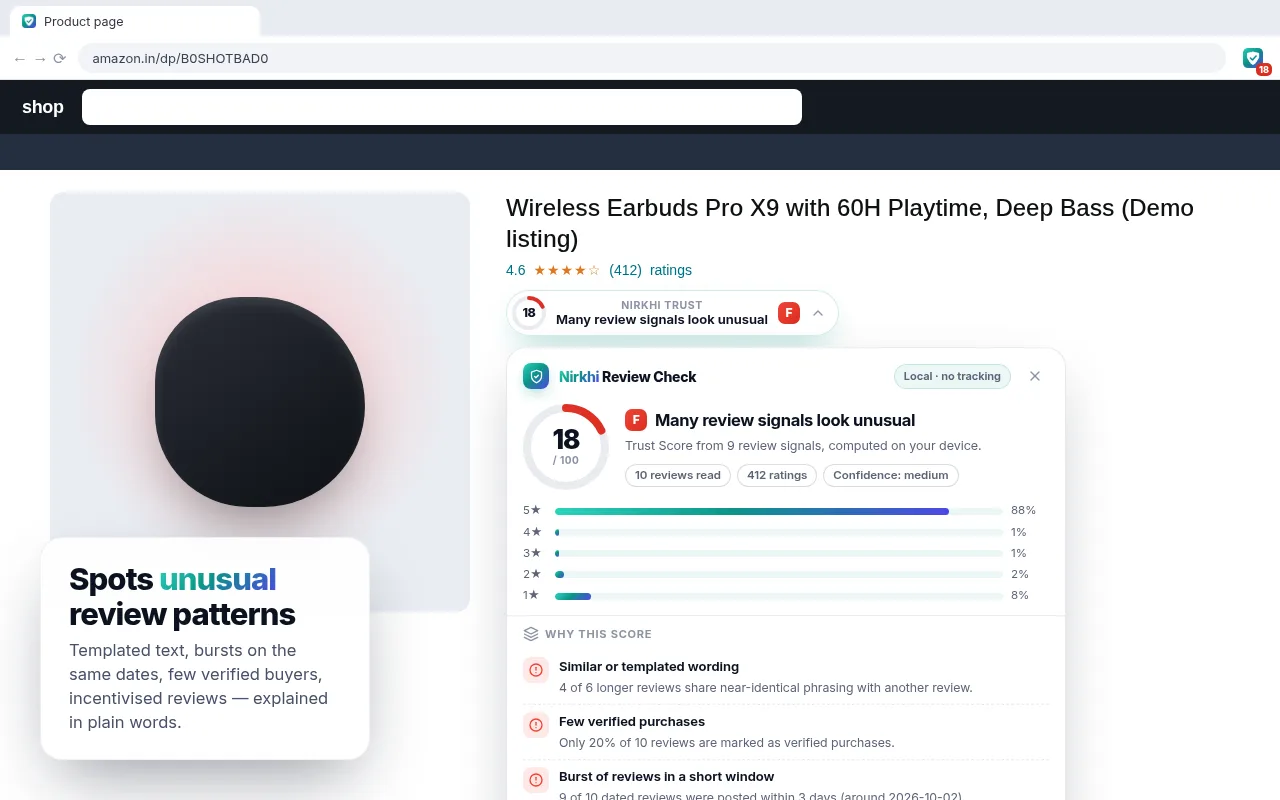
How to read the score
Nirkhi combines the signals above into one number. As a rough guide: an A or B grade means the reviews it could read look like a normal mix; C means some things deserve a second look; D or F means several unusual patterns showed up together. The score is only based on the reviews visible to the extension (it can read up to three extra review pages for a bigger sample), so treat it as a starting point.
Other checks that help
- Compare the price history and the seller name — the same listing can have several sellers.
- Check the return policy and warranty terms before you buy.
- Look for reviews on YouTube or forums from people who are not selling anything.
Privacy
Nirkhi runs in your browser. It has no servers, no analytics and no tracking, and it doesn’t send your browsing or the reviews anywhere. Read the privacy policy. Nirkhi is not affiliated with Amazon.
Summary
Reliable-looking reviews have a natural rating spread, plenty of Verified Purchases, specific details and photos. Unusual patterns — bursts, J-shapes, copy-paste text — mean you should slow down and read more. Nirkhi checks these signals automatically and explains them, but the final call is always yours. See also what to look for on Flipkart and the Bengali guide.