How to Compress a PDF to 100KB (Free, Offline)
Almost every online application in India has the same rule somewhere on the page: “Upload PDF, maximum size 100KB.” Job portals, university admissions, scholarship sites and government services all use limits like this. A scanned certificate from a phone camera is often 1–5MB, so the upload simply fails.
Most people then search for an online compressor, upload their Aadhaar, marksheet or caste certificate to an unknown website and hope for the best. That works, but it means handing personal documents to a server you know nothing about. This guide shows a way to compress a PDF to 100KB inside your own browser, offline, using the free Patla PDF extension for Chrome.
What you need
- Google Chrome (or another Chromium browser such as Edge or Brave) on a computer.
- The free Patla PDF extension.
- Your PDF file. It does not need to be uploaded anywhere.
Step by step
- Install Patla PDF. Open the Chrome Web Store page for Patla PDF, click Add to Chrome, then pin the icon from the puzzle-piece menu so it is always one click away.
- Open the Compress PDF tab. Click the Patla PDF icon and open the full app. The Compress PDF tab is selected by default.
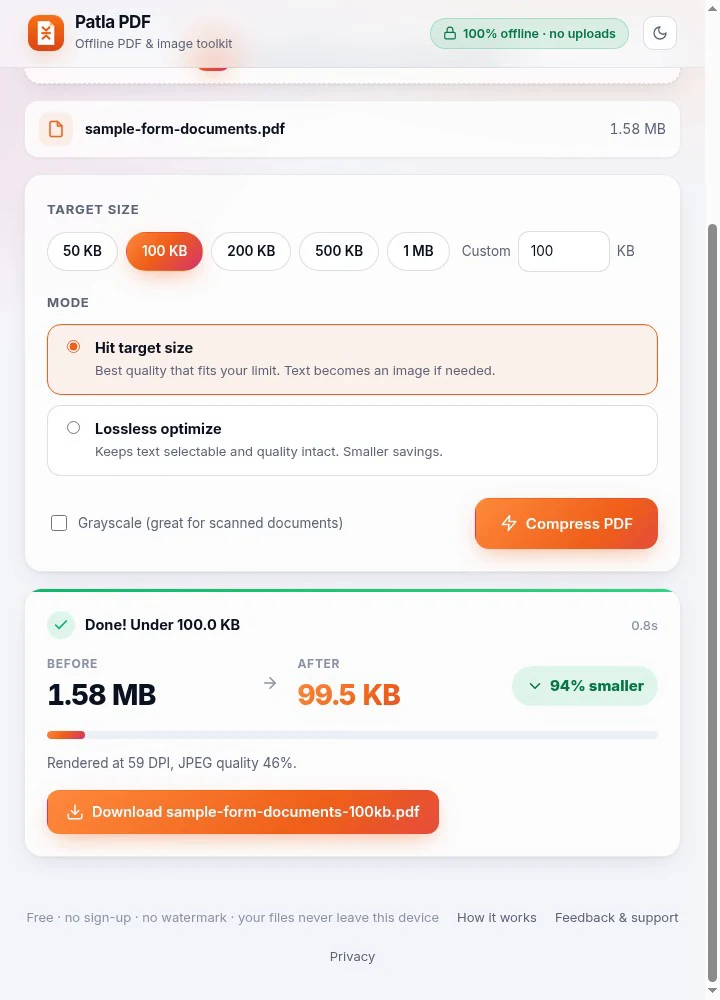
- Add your PDF. Drag the PDF onto the drop area or click to browse. The file name and its current size appear, e.g. 1.58 MB.
- Choose 100 KB. Under Target size, click 100 KB. If your form allows a different limit, pick 50 KB, 200 KB, 500 KB, 1 MB or type a custom value. Tip: set it slightly under the limit (for example 95 KB) if a portal is strict.
- Pick a mode. Hit target size gets the best quality that fits your limit and is the right choice for most scans. Lossless optimize keeps text selectable but saves less. Tick Grayscale for black-and-white documents to keep them sharper at small sizes.
- Compress and download. Click Compress PDF. When it says Done! Under 100.0 KB, click Download. Open the file once to check it is readable before you upload it.
Why “Hit target size” works so well for forms
Scanned documents are really photos inside a PDF. Patla PDF renders each page and then searches for the highest resolution and JPEG quality that still keeps the whole file under your target. You do not have to guess quality sliders or try five times; it tells you the final size and the settings it used (for example 59 DPI, JPEG quality 46%).
Common problems and fixes
- Text looks blurry. Turn on Grayscale, or remove blank pages first using the Split tab (extract only the pages you need).
- The portal still rejects the file. Some sites count 1KB as 1000 bytes rather than 1024. Set the target to 95KB to leave a margin.
- I need several certificates in one file. Use the Merge tab to combine them first, then compress the merged PDF.
- I need selectable text. Use Lossless optimize. It will not reach very small sizes on scans, but it keeps text as text.
Is it safe?
Patla PDF has no server. The PDF is read into memory in the extension page, processed with bundled libraries (PDF.js and pdf-lib) and saved only when you click Download. It needs no special permissions and does not track you. You can read the full privacy policy. Because nothing is uploaded, it also works with no internet connection, which is handy at a cyber café with a slow line.
Summary
To compress a PDF to 100KB: install Patla PDF, drop your file in the Compress PDF tab, choose 100 KB, press Compress and download. It takes a few seconds, costs nothing and your documents stay on your own computer. Need to shrink a photo or signature as well? Read how to reduce photo size to 20–50KB. বাংলায় পড়তে: কীভাবে PDF 100KB করবেন.